Ihre Vorteile im Überblick
Mit einer Registrierung bei myWIFI können Sie Ihre Kontaktdaten und Ihr Profil ändern und jederzeit einen Überblick über Ihre WIFI-Kurse und Prüfungsergebnisse abrufen.
LOGIN / REGISTRIERUNG

Learn Microsoft independent of time and place. With our eLearning course offering of Microsoft programs, you benefit from eLearning lessons combined with practical examples, eBooks and learning videos. You can start your training at any time. You will then be able to practice for an entire year from the comfort of your home, in your office, during your commute or wherever you want.


-


Preis für WIFI TrainerInnen auf Anfrage Kursnummer: 424450161.031,00 EUR
Preis für WIFI TrainerInnen auf Anfrage Kursnummer: 42445016
Microsoft Kurs eLearning | english
Beschreibung
Discover the application programs and learn to master all the functions. In this training you will get to know the Micorosoft application programs from basic to advanced functions.
ELearning offers various forms of learning, so different types of learners can absorb the content in the most suitable way and consolidate it with practical examples.
You also have the option of booking a one-to-one training session with one of our English-speaking trainers from the field. Please contact us directly by email if required: michaela.heidegger@wktirol.at
ELearning offers various forms of learning, so different types of learners can absorb the content in the most suitable way and consolidate it with practical examples.
You also have the option of booking a one-to-one training session with one of our English-speaking trainers from the field. Please contact us directly by email if required: michaela.heidegger@wktirol.at
- /images/BB/microsoft kurse/anwender/1-Usecase-Excel-en.png
- /images/BB/microsoft kurse/anwender/2-dashboard-anwender-en.png
- /images/BB/microsoft kurse/anwender/3-Video-Powerpoint-en.png
- /images/BB/microsoft kurse/anwender/4-Fortschritt-Office365-en.png
Überblick
Voraussetzungen
- No previous knowledge of the microsoft programs is required. Slight prior knowledge can be an advantage and lead to faster learning success. The placement test helps you with your individual selection of the lessons.
- You need a device with an internet connection.
Zielgruppe
- For everyone who wants to learn how to use microsoft office programs.
- Do you already know how to use the microsoft programs? Then this learning path is suitable as a repetition or as a refresher of your skills. You can also use this module to learn more about advanced functions.
Abschluss
You will receive your confirmation of participation when you have completed 75% of the learning content on the WIFI learning platform.
Mehr lesen im Blog

Downloads

Hinweis
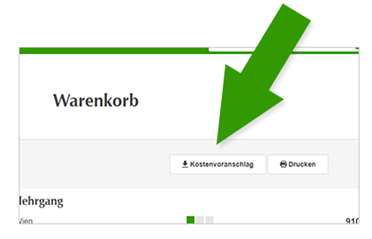
Ab sofort können Sie Kostenvoranschläge
direkt in Ihrem Warenkorb erstellen
Fügen Sie einfach verschiedene Kurse zu Ihrem Warenkorb hinzu und erstellen Sie danach Ihren gewünschten Kostenvoranschlag."